3. Direct Server Return Example (Single Legged)
The initial Web Server Network
The initial web server network before adding BalanceNG load balancing is the same as in Example 1 (switches not shown):

Network configuration before deploying BalanceNG
For this example we assume the following IPv4 network parameters being valid within the local network:
Network address:   172.16.1.0/24
Broadcast address: 172.16.1.255
Netmask:           255.255.255.0
The Web server has the IP address 172.16.1.10 with a web server program like Apache listening on Port 80. The default route of this box is set to 172.16.1.254, which is the address that the router offers as a routing endpoint address towards the local network.
Things that obviously work:
- You should be able to ping the default gateway 172.16.1.254 from the Web Server.
- Clients from the Internet are able to initiate TCP connection to port 80 on the Web Server 172.16.1.10.
Adding DSR Load Balancing with BalanceNG
DSR comes with several advantages:
- There’s no change of any network component and no additional network parameters required
- The general throughput is optimal for typical server applications since BalanceNG only needs to rewrite the request packets.
There’s one thing that’s not possible with DSR:
- Since the targets are talking directly to the clients any processing of the packets by BalanceNG is not possible (e.g. port rewriting).
The key idea for BalanceNG in DSR mode is to configure the IP address of the Virtual Server (172.16.1.10 in this example) as an alias on the Loopback interface on the Targets.
This makes the Targets addressable on Layer 2 leaving the Virtual Server Address unchanged. The machine must not answer any ARP requests for the virtual server address, there’s an additional step required (see below).
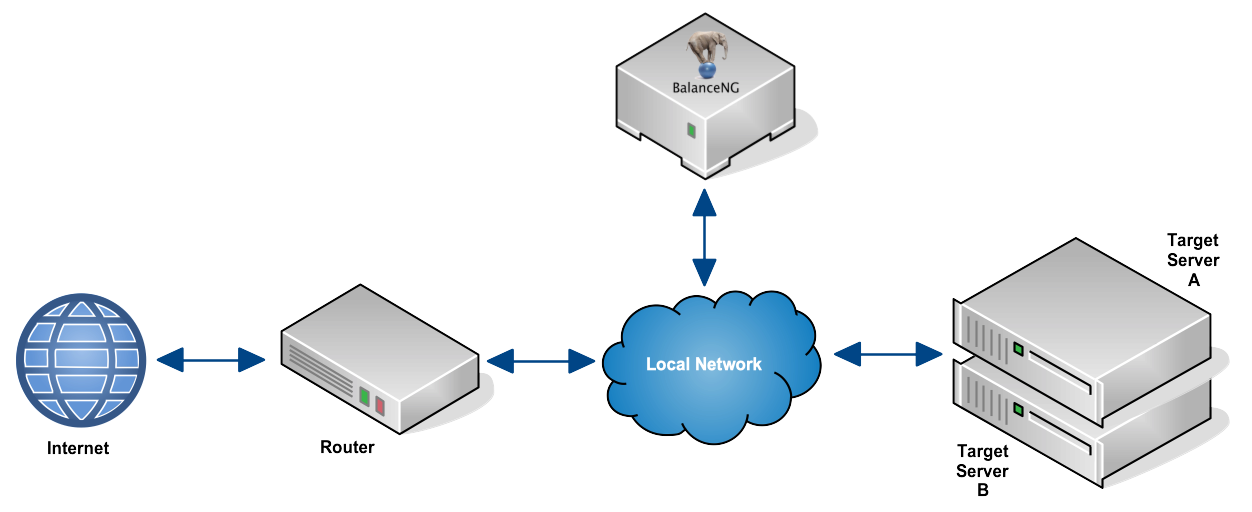
Network configuration with BalanceNG in DSR mode
The network with BalanceNG added looks the same as in Example 1, but with DSR we work with loopback aliases (instead of adding a second Layer 3 network).
Establishing the Loopback Aliases
Use the following commands to establish the Loopback-alias on the Targets:
Linux: ifconfig lo:0netmask 255.255.255.255 -arp up Solaris: ifconfig lo0:1 plumb ifconfig lo0:1 netmask 255.255.255.255 up
In our example this would be the following command line (assuming a Linux operating system) executed on both Target 1 and Target 2:
# ifconfig lo:0 172.16.1.10 netmask 255.255.255.255 -arp up
Additionally it is necessary to disable invalid ARP replies (for Linux, take a look at the FAQ):
# echo 1 > /proc/sys/net/ipv4/conf/all/arp_ignore
# echo 2 > /proc/sys/net/ipv4/conf/all/arp_announce
The Packet flow with DSR is as follows:

DSR packet flow
The BalanceNG Config File
This is the BalanceNG configuration for this DSR example. The BalanceNG box is connected to the switch with one interface (eth0) only. The “real” address in the network section is being used as source address for ARP resolving and health checks.
//        configuration taken ...
//        BalanceNG ...
modules   vrrp,arp,ping,hc,master,slb,tnat,nat,rt
interface 1 {
          name eth0
          access raw
}
register  interface 1
enable    interface 1
network 1 {
          name "local network"
          addr 172.16.1.0
          mask 255.255.255.0
          real 172.16.1.252
          virt 172.16.1.253
          interface 1
}
register  network 1
enable    network 1
server    1 {
          ipaddr 172.16.1.10
          port 80
          protocol tcp
          targets 1,2
}
register  server 1
enable    server 1
target    1 {
          ipaddr 172.16.1.100
          port 80
          protocol tcp
          tcpopen 80,3,10
          dsr enable
}
target    2 {
          ipaddr 172.16.1.101
          port 80
          protocol tcp
          tcpopen 80,3,10
          dsr enable
}
register  targets 1,2
enable    targets 1,2
//        end of configuration
Testing
- You should be able to ping the default gateway 10.1.1.254 from the target servers.
- You should be able to ping the virtual web server 172.16.1.10 from the router.
- Clients from the Internet should be able to initiate TCP connection to port 80 on the virtual Web Server 172.16.1.10 (now being represented by BalanceNG).
- “show servers” and “show targets” in BalanceNG interactive mode should show everything up and operational.